Many websites today are built on a Single-Page Application (SPA) architecture. With more businesses using vibe-coded AI builders like Lovable and Bolt.new to ship web apps incredibly quickly, the adoption of React, Vue, and Angular codebases has skyrocketed.
However, because these AI tools rapidly generate client-rendered JavaScript applications, many business owners inadvertently launch platforms that search engines struggle to read. Consequently, these websites experience poor organic performance, severely limiting content visibility on SERPs right out of the gate. Across the multi-framework SPA sites we work with, our team routinely uncovers these exact systemic visibility blockages during our initial technical audits.
If you want your SPAs to rank on Google and be mentioned in AI-generated answers, you need a clear SPA SEO strategy. In this blog post, we dive deep into the best practices for optimizing single-page applications (SPAs) for SEO: what they are, why they cause JavaScript rendering issues, and how to ensure your modern, AI-built site is fully optimized for maximum search visibility.
What are SPAs, and Why SPAs Are Not SEO-Friendly
Before we learn why SPA can jeopardize your SEO efforts, let’s cover the basics: what is a single-page application (SPA)?
SPA is a JavaScript-based web application that dynamically updates an existing page, as opposed to fetching complete new pages from the server.
Unlike traditional applications (common websites) that store separate pages as distinct HTML files, SPAs utilize one single-page template to render dynamic web pages through AJAX calls. Hence, the name, single-page application.
Since SPA uses a single-page template to house all your content, it eliminates the need for additional page loads after the initial loading process. Consequently, this contributes to a more seamless and responsive user experience (UX) and faster page loading time. However, this reliance on JavaScript comes at a cost. SPAs inherit the crawling and indexing challenges of JS, causing some SEO problems. Many of the engineering teams our team spoke to often overlook this exact handoff between client-side speed and search engine visibility until organic traffic begins to plateau.
Pro tip: Learn how Google and other search engines index JavaScript pages in this blog.
Why SPAs Cause JavaScript SEO Problems
For a search engine to crawl a page, it must first discover the page, render and crawl the content to understand it, and then index it.
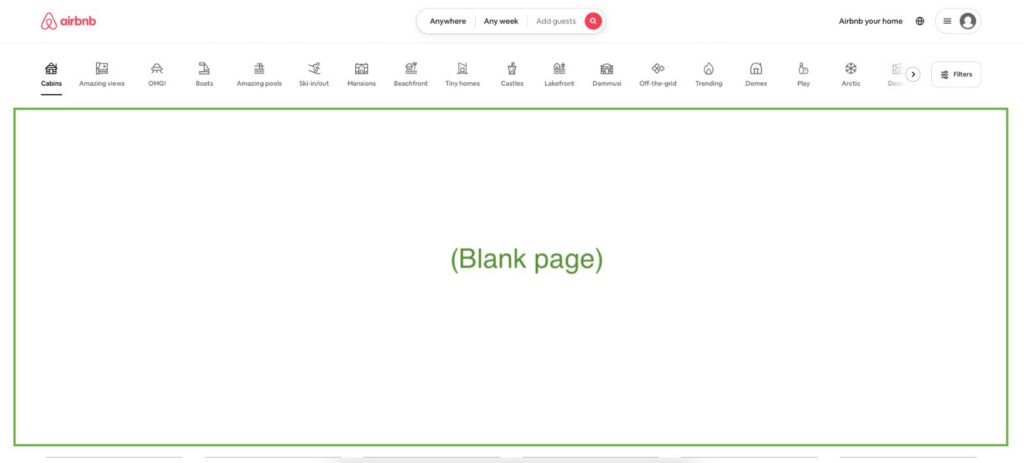
The problem with SPA indexing is that SPAs only display page content and elements through a dynamic API call. This means crawlers only see an empty container when they visit SPAs. And without any content to crawl, there’s nothing to index, and your page won’t show up on Google SERPs.
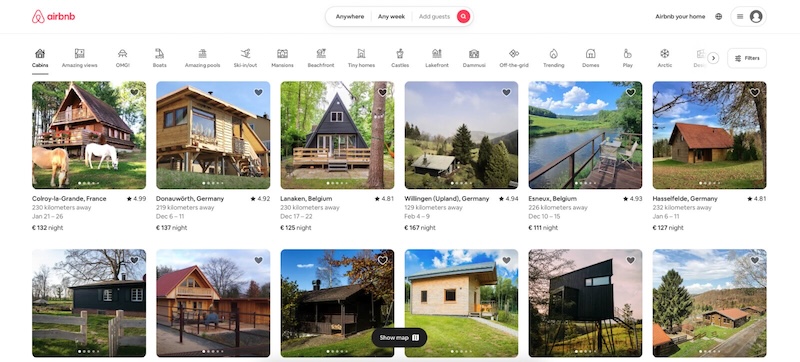
Here is what an SPA page looks like from the user side:
Here’s what Googlebot would see when accessing the page:
While SPAs have significant benefits, they won’t bring you traffic if you don’t know how to optimize SPA. Luckily, we’re here to show you exactly how to make the SPA pages 100% crawled and indexed. After talking with some top technical SEO experts and comparing notes on modern crawl behavior, we have mapped out exactly how to ensure your SPA pages are 100% crawled and indexed.
10 Solutions to Improve the SEO Performance of Single-Page Applications (SPAs)
1. Server-Side Rendering (SSR)
Server-side rendering (SSR) refers to a rendering technique where all the rendering process happens on the server before sending it to the client (browser). How does this affect SPA websites in terms of crawling and indexing?
With SSR, SPAs will render the JavaScript files on the server. When search engine crawlers request a page, the content is passed to the browser and is read as a fully rendered static HTML page. This results in a much faster loading time, as well as faster crawling and indexing time. And since the browser gets the content quicker, your rankings will also be boosted.
However, while SSR is a great way to optimize single-page application websites, there’s a significant reason why it’s not widely used: it’s expensive and difficult to implement. For SSR to work, you must invest a minimum of $120k upfront in servers, engineering hours, and expertise, depending on your company size. Then there’s still the problem of scalability and maintenance. Across the enterprise client sites we work with, we frequently see mid-funnel migration roadmaps stall for months due to the pure technical complexity of rewriting code for an SSR environment. SSR may be a good way to optimize SPA, but it’s not a fix-all solution.
2. Implement SEO-friendly URLs
Another technique for optimizing SPAs is implementing SEO-friendly URLs. This method provides search engine crawlers with clear paths by offering a structured and easily navigable hierarchy. Because of this, the crawling process is streamlined, ensuring that search engines can efficiently explore all elements of your single-page application website.
To create SEO-friendly URLs, it is fundamental to set up your URL router properly. If your router operates in hash mode, it appends #hash fragments to your home page URL. This will cause crawlers to ignore different app views of your SPA because the crawlers see hashed URLs as different parts of the same page.
To achieve clean and SEO-friendly URLs while mitigating the risk of 404 errors, it’s essential to establish a fallback route on your server. This route redirects requests to your index.html page, where your app resides. Although this involves additional steps, popular JavaScript frameworks and libraries offer options for implementing this redirect.
A common mistake some SPAs make is using a single URL for everything on the app. This is a bad practice. When there’s just a single URL for everything, crawlers only see the home page and will not understand what the whole site is about. Therefore, you must treat views as URLs and change the URL anytime the app view changes.
Additionally, based on our team’s experience auditing client single-page applications, you must explicitly treat individual views as unique URLs and programmatically fire router changes anytime the application view changes.
3. Prerendering with Prerender.io
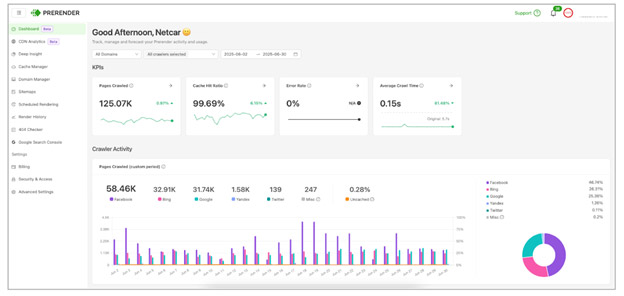
By the time most SPA teams reach prerendering, they’ve already done the standard work. URLs are configured with history mode, the sitemap is clean and submitted, internal linking is in place, and core technical SEO passes every audit. Yet, many pages are still seen as “Crawled — currently not indexed” in your Google Search Console. That pattern is what makes prerendering relevant: the response body on first fetch is an empty container, and until that changes, no amount of configuration work moves the coverage report.
For teams working on SPA SEO, the key issue is whether a crawler receives indexable HTML on its first request.
Prerender.io addresses this by serving a fully rendered HTML snapshot to crawlers on first request, so every URL returns indexable content the moment it’s fetched. Since Prerender.io renders your website pages in advance, it’s able to deliver your pages within 0.03 seconds on average, dramatically improving your server response time. Clients also see other SEO benefits, including better indexing, rankings, traffic, and even revenue. His approach is especially powerful if you are shipping website fast with new AI website builder stacks. You can read our complete walkthrough on how to make Lovable websites SEO friendly using this setup.
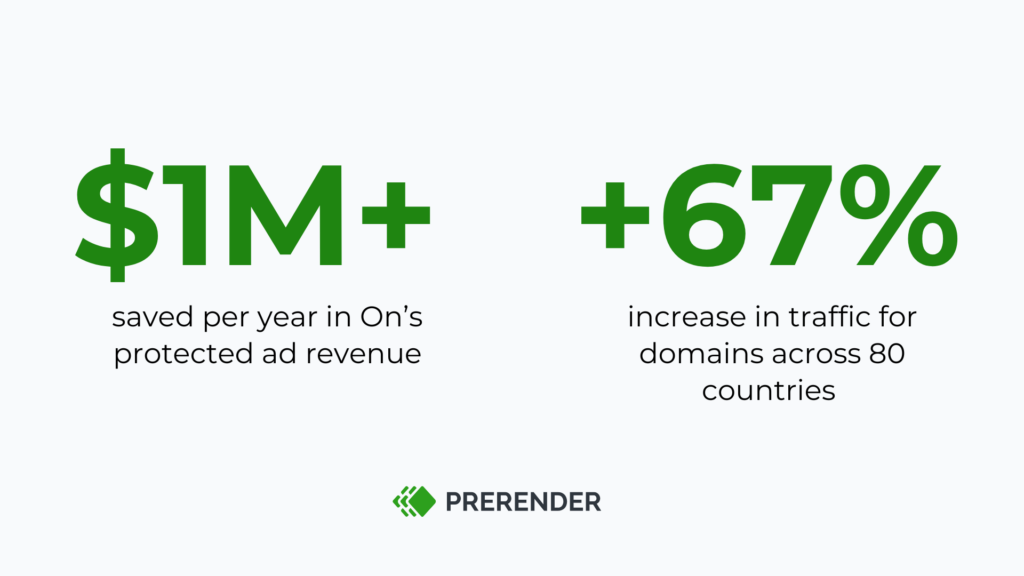
Check out the results from On, one of the world’s top athletic brands, after using Prerender.io instead of SSR.
4. Ensure Your SPAs are Mobile Friendly
If your SPA isn’t mobile-friendly, you have a lower chance of ranking high on SERPs. Google prioritizes mobile-first indexing, which means it mainly looks at your site’s mobile version when deciding rankings. This means that if your SPA loads slowly and/or has unoptimized layouts and font sizes, it’s going to hurt both your SEO and user engagement.
So, how do you make sure your SPA is mobile-friendly?
Start with responsive design. Your site should adjust smoothly to any screen size, whether it’s a phone, tablet, or desktop. Luckily, frameworks like React, Vue.js, and Angular make this easier with flexible layouts and built-in tools for responsiveness, but we’ll talk about that later.
Then there’s navigation. Ever tapped a button on a site and accidentally clicked the wrong thing? Frustrating, right? That’s why it’s important to use touch-friendly buttons, properly spaced menu items, and an intuitive layout that works well on smaller screens.
Finally, don’t just assume everything works—test it. Use Google’s Mobile-Friendly Test and Lighthouse audits to see where your site might be falling short. Fixing any issues early on will keep visitors happy and help your rankings.
Check out our comprehensive ‘How to make a site mobile-friendly’ guide to learn the details.
5. Use Hreflang for Multi-Language SPAs
If your SPA supports multiple languages but isn’t using hreflang, you might be confusing search engines and frustrating users. They need to search for the language selection settings and Google relies on hreflang tags to serve the right language version of your site to the right audience. Without them, your content might show up in the wrong language or, even worse, get flagged as duplicate content, which can hurt your SPA SEO.
So, how do you make sure Google understands your multi-language SPA? Start by giving each language its own unique URL. Even though SPAs rely on JavaScript, search engines still need clear, distinct URLs to index different versions properly. A good setup looks something like this:
- example.com/en/ for English
- example.com/es/ for Spanish
- example.com/fr/ for French
Next, you need to actually add hreflang tags to tell Google which page belongs to which language. You can include these in the <head> section of your site or, for larger sites, in your XML sitemap. This helps Google understand that, for example, example.com/es/ is the Spanish version of example.com/en/, so it won’t mix them up.
What we see on multi-language SPA sites is a failure mode that the hreflang setup above doesn’t address on its own. The tags are correctly implemented: they exist in the DOM, they validate in testing tools, and they render properly when you inspect the page in Chrome. But most crawlers, including AI search engines like ChatGPT and Perplexity, don’t execute JavaScript. They receive the initial HTML response, find no hreflang signals, and either serve the wrong language version or flag the content as duplicate across markets.
The underlying issue extends beyond hreflang. On a JS-rendered SPA, the initial HTML response the crawler receives contains a basic head, an empty div, and a script bundle. None of the metadata added after hydration is present: hreflang tags, Open Graph tags, canonical tags, and schema markup are all absent from that first response. Pre-rendered HTML delivers those tags in the initial response, so crawlers receive the correct language and metadata signals on first fetch regardless of whether they execute JS.
6. Page Splitting and Lazy Loading Your SPAs
Page splitting (also called code splitting) breaks your SPA into smaller chunks instead of forcing the browser to load everything up front. This means your site loads faster, especially for first-time visitors. Most modern JavaScript frameworks—like React, Vue, and Angular—make this easy with built-in support for dynamic imports.
Lazy loading, on the other hand, enables the images or content on your SPAs to appear later until you scroll down the site. Instead of loading every single image, script, or video right away, lazy loading delays loading non-essential content until it’s actually needed. This speeds up page load times and saves bandwidth, making your site feel more responsive and boosting the overall SPA SEO health.
Here’s how to lazy load SPAs:
- Use dynamic imports in your code so that different parts of your app load only when a user actually needs them.
- Lazy load images and videos with the loading=”lazy” attribute in HTML or use a JavaScript library like lazysizes to do the heavy lifting.
- Prioritize above-the-fold content so that users see important elements immediately, while the rest loads in the background.
7. Use SEO-Friendly JavaScript Frameworks
Not all JavaScript frameworks are built with SEO in mind. Some make it harder for search engines to crawl and index content, which can hurt your rankings. If your SPA relies heavily on JavaScript but isn’t optimized for SEO, you could be invisible to Google, no matter how great your content is.
Keeping these frameworks crawlable is no longer just about Googlebot—it is now vital for the LLM agents scraping the web. Discover how to optimize an enterprise site for agentic AI to ensure your framework choice doesn’t lock out AI search traffic.
To avoid this, use an SEO-friendly JavaScript framework or tweak your existing setup to improve crawlability. The best frameworks to use are:
- Next.js (for React)
Offers server-side rendering (SSR) and static site generation (SSG) out of the box, making it one of the best choices for SEO. It ensures that search engines can crawl and index content efficiently while improving page speed. Learn how to optimize Next.js for SEO here. - AngularJS
Since AngularJS relies heavily on client-side rendering, it’s not inherently SEO-friendly. However, AngularJS can be optimized using a prerendering tool like Prerender.io to ensure that search engines can properly index the content. - Vue.js (with Nuxt.js)
Nuxt.js extends Vue with built-in SSR and SSG capabilities, improving performance and making Vue-based SPAs more search engine-friendly. You can easily SEO-optimize any SPAs built with Vue.js by following this VueJS SPA optimization tutorial.
8. Schema Markup for SPA Rich Snippets
If you want your SPAs to stand out in search results, schema markup is an excellent technique. Schema markup helps search engines understand your content better and provides you with a rich content snippet, such as product ratings, product prices, and FAQs for popular queries. These not only make your content listing more attractive but also boost click-through rates (CTR).
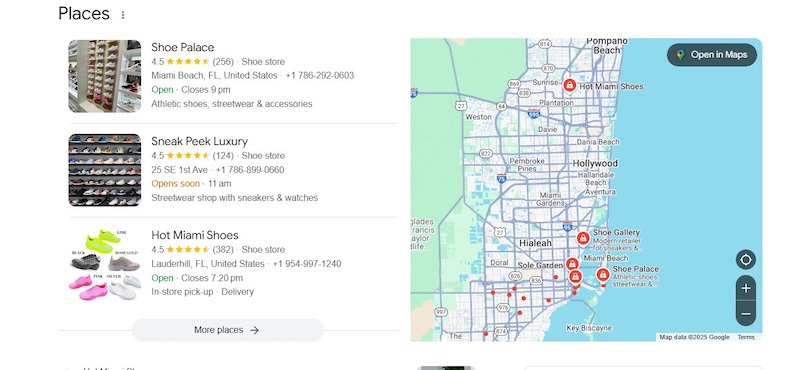
Additionally, Schema markup provides structured data that tells Google what the content hosted on your SPAs is about. This means search engines don’t have to guess, making it easier for them to index your pages accurately. Rich snippets can appear for various content types, including:
- Articles and blogs: Enhances visibility with author names, dates, and images.
- Products and reviews: Displays ratings, prices, and availability directly in search results.
- FAQs and how-to guides: Helps you land in Google’s “People Also Ask” section.
- Events and recipes: Highlights event dates, locations, ingredients, and preparation steps.
Because SPAs dynamically load content with JavaScript, you’ll need to ensure that search engines can detect the structured data properly. To do this, you can dynamically inject JSON-LD schema markup into the <head> or append it to the DOM on load. If using Next.js or Nuxt.js, leverage server-side rendering (SSR) or pre-rendering to ensure crawlers can access structured data instantly.
Related: Which is better, building an in-house SSR or adopting Prerender.io as your JavaScript rendering solution? Our blog has the answer.
9. Use Canonical Tags to Avoid Duplicate Content Issues
SPAs can be a mess when it comes to URLs. Because of how JavaScript handles routing, your site might generate multiple URLs for the same content—whether it’s through query parameters, session-based links, or dynamic filtering. This can confuse search engines, making them think you have duplicate content, which can hurt your SEO rankings.
A canonical tag (rel=”canonical”) tells search engines, “Hey, this is the main version of this page—ignore the rest.” It helps:
- Avoid duplicate content penalties
- Make sure link juice (SEO value) isn’t spread across multiple versions of the same page
- Tell search engines which URL to rank
Since SPAs load content dynamically, canonical tags need to be updated as users navigate. To handle canonical tags gracefully, you can hardcode or use JavaScript to update your canonical tag:
| function updateCanonical(url) { let link = document.querySelector(“link[rel=’canonical’]”); if (!link) { link = document.createElement(“link”); link.rel = “canonical”; document.head.appendChild(link); } link.href = url; } updateCanonical(window.location.href); |
10. Use Server-Side Redirects Instead of Client-Side Redirects
When your SPA is relying on client-side redirects, you’re making search engines (and by extension, also users) work harder than they need to process your SPA content. Google expects proper server-side redirects, which ensure the right pages get indexed and ranked. If your redirects depend on JavaScript, search engines can’t execute and follow them, leading to crawling issues, lost rankings, and slower page loads.
So, how do you make sure your SPA handles redirects the right way? Start with server-side redirects. These ensure that when a page moves or is replaced, both search engines and users are seamlessly taken to the correct destination without delay.
Pro tip: Most backend frameworks, including Node.js, Express, and Next.js, offer built-in support for proper redirect handling.
Solve Your Single-Page Application SEO Problems With Prerender
Each of these ten optimization tips fixes a specific SPA failure mode. On a 35,000-product SPA where every first-wave fetch returns an empty container, those failure modes compound across every URL simultaneously, and every unindexed page is traffic and revenue the site isn’t capturing. The resolution at that scale shifts from optimizing individual pages for SEO to controlling what crawlers receive the moment they arrive.
By eliminating the requests between the server and browser, SPAs can greatly enhance PageSpeed and UX. As the internet continues to evolve, SPAs will likely become one of the most popular types of web applications.
We’ve gone over important tips for optimizing SPAs in this blog. While all three methods will yield significant SEO results, the most resource-efficient strategy is setting up a pre-built rendering system with Prerender. Trusted by 100,000+ brands worldwide and known for its easy installation, our platform can help your SPA see better SEO within weeks.
Think it might be right for you? Join brands like HubSpot, Figma, Salesforce, and more and try Prerender.io for free.
Further Reading on SEO for SPAs
If you’d like to learn more about how to improve your SEO for your single-page application, take a look at these resources:
FAQs on How to Optimize Single Page Applications (SPAs) for Healthier SEO Performance
Answering some common questions about SPA SEO, crawling and indexing in SPAs, and Prerender.io.
1. Are There SEO Advantages to Using a SPA Over a Traditional Multi-Page Application?
When implemented correctly and well-optimized for search, SPAs can offer several SEO advantages:
- Faster perceived page loads after initial load, potentially improving user engagement metrics
- Easier implementation of dynamic content updates without full page reloads
- Improved UX, which can indirectly benefit SEO through better engagement metrics
- And the potential for better mobile performance
However, these only apply if the SPA is well-optimized for search engines. Without proper optimization, traditional multi-page apps can have a leg up regarding crawlability and indexability. The key is to leverage the benefits of SPAs while ensuring they’re fully accessible to search engine bots.
2. How Do Search Engines Handle JavaScript in SPAs?
Even though search engines are much better at processing JavaScript today, complex SPAs still pose significant challenges. Search crawlers depend on HTML to index pages, but because JavaScript-heavy SPAs load their content dynamically, it is difficult for bots to access critical information. For instance, Googlebot handles JavaScript in two separate stages—first parsing the initial HTML, and later rendering the JavaScript. If this rendering process encounters an error or takes too long, your content may never be found and indexed.
3. What Tools Can I Use to Test and Debug SPA SEO Issues?
You can use the following tools to test and solve SPA SEO issues:
- Google Search Console: shows indexing issues and lets you see how Googlebot views your pages.
- Lighthouse: helps audit SEO performance and JavaScript execution.
- Google’s Mobile-Friendly and Rich Results tests: ensure your content works well on mobile and supports structured data.
- Prerender.io: helps JavaScript-heavy SPAs generate static HTML versions to make crawling easier.
- Screaming Frog: its SEO spider can mimic a search bot to spot missing content.
4. Which Rendering Approach is Best for SPA SEO: Client-Side Rendering, Server-Side Rendering, or Pre-rendering?
If you have Single Page Applications (SPAs) and want the best SEO results without the complexity of server-side rendering, pre-rendering with Prerender.io is the way to go. Unlike client-side rendering (CSR), which can leave search engines struggling to index JavaScript-heavy content, Prerender.io generates static HTML snapshots that search bots can easily crawl. It delivers the benefits of SSR without the extra development overhead, making it a simple, scalable, and effective SEO solution for SPAs. See in detail how Prerender.io vs. SSR vs. CSR compare.